Source Plane
Image Plane
Lens Parameters
Real Gravitational Lensing Example
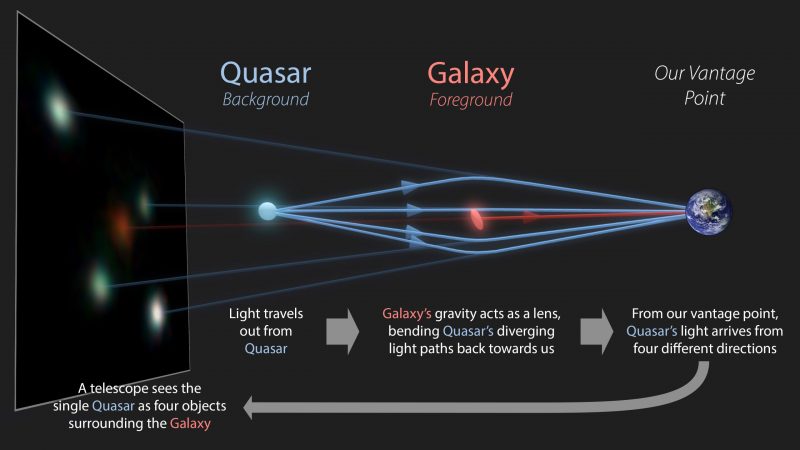
Image via R. Hurt (IPAC/Caltech) / The GraL Collaboration / ESA
How This Gravitational Lens Simulator Works
About This Simulator
This free gravitational lensing simulator is a web-based tool built around PyAutoLens, a powerful Python package for strong gravitational lens modeling. Gravitational lensing occurs when a massive object (like a galaxy or galaxy cluster) bends the path of light from a more distant source. This creates distorted, magnified, or multiple images of the background object. Strong gravitational lensing can produce dramatic Einstein rings when the source, lens, and observer are perfectly aligned. Perfect for students, educators, and astrophysics enthusiasts, this simulator lets you explore how massive objects like galaxies bend light from distant sources through gravitational lensing.
Using advanced ray tracing techniques, the simulator forward models a simple, circular Gaussian source into the image plane. Watch in real-time as you adjust parameters to create stunning Einstein rings and caustic patterns. Specifically, it:
- Implements a single isothermal elliptical mass profile as the gravitational lens
- Uses a simple Gaussian light source as the background object being lensed
- Performs accurate ray tracing from the image plane back to the source plane
- Visualizes how lens alignment, mass distribution, and ellipticity affect Einstein ring formation and strong lensing patterns
- Displays caustic lines showing critical curves in the source plane
Limitations
This simulator uses PyAutoLens, the same ray tracing algorithms used in professional astrophysics research for modeling gravitational lenses. While simplified for educational purposes with a single lens and Gaussian source, the underlying physics and mathematics are accurate representations of strong gravitational lensing. This simulator is designed for only educational purposes, and because I thought it was fun. If you need to model real gravitational lens observations, please use the full PyAutoLens package directly.
What do the different parameters control?
The Einstein Radius controls the overall lensing strength, the Center X/Y positions adjust lens alignment, the Axis Ratio determines lens ellipticity (how round vs elongated), and the Position Angle rotates the lens orientation. Adjusting these parameters lets you explore how different lens properties affect Einstein ring formation and caustic patterns.
Citation
If you use PyAutoLens or insights from this simulator in your research, please cite the appropriate papers. See the PyAutoLens GitHub for citation information.